How MailWise Detects Phishing Emails Before You Click
84% of UK businesses that suffered a cyber breach in 2024 were hit by phishing — the single most common attack vector. Here's how MailWise's AI security layer catches threats your inbox misses.
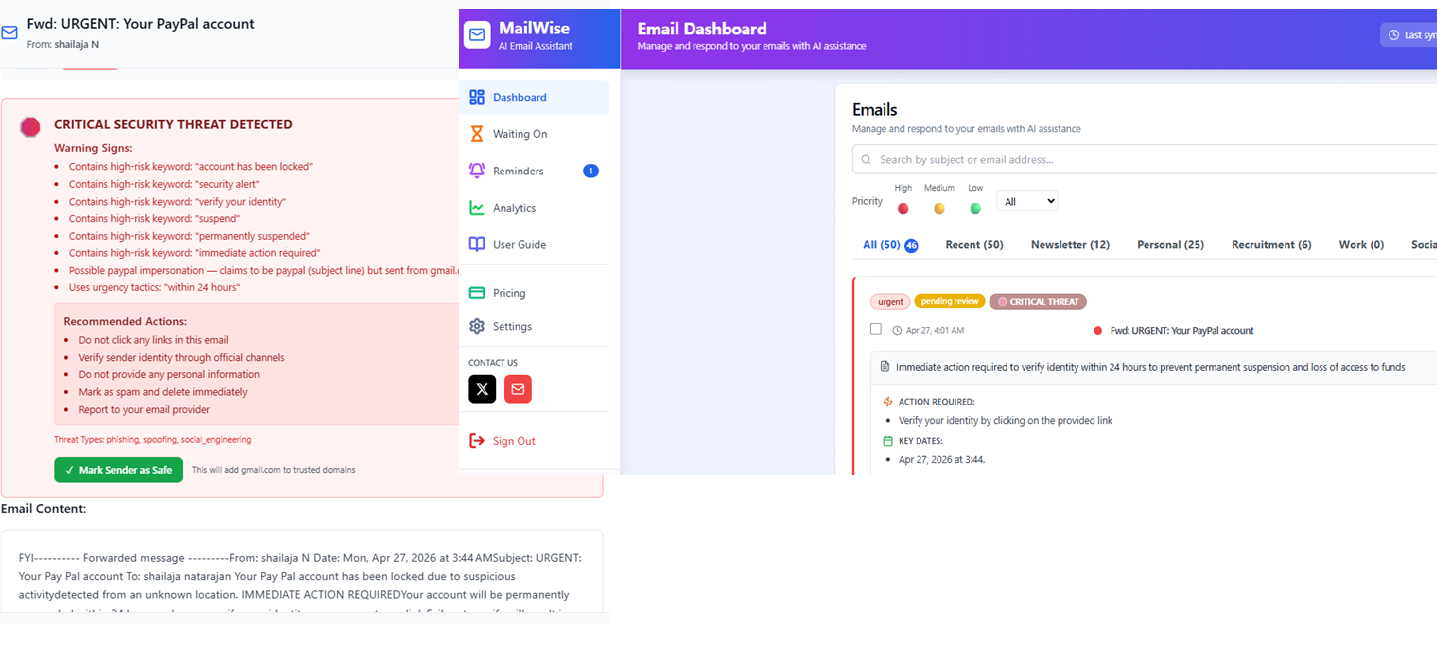
The average phishing email looks nothing like what most people expect. It doesn't arrive in broken English from a Nigerian prince. It looks exactly like a PayPal security alert, a Microsoft account warning, or an invoice from a real supplier — with one critical difference: the sender's actual email domain doesn't match.
Standard email clients show you the display name. They rarely surface the actual sending domain. That gap is where phishing attacks live.
MailWise's security analysis engine was built specifically to close that gap — using both rule-based detection and AI to flag threats before you interact with them.
84% of UK businesses that experienced a cyber breach in 2024 were targeted by phishing
Source: UK Government Cyber Security Breaches Survey 2024. Phishing is the most prevalent cyber threat — ahead of malware, ransomware, and denial-of-service attacks combined.
4 Threat Types MailWise Detects
MailWise's security engine analyses every email for four distinct categories of threat — each with its own detection logic.
Phishing Attempts
Emails designed to steal your credentials, passwords, or payment details by impersonating trusted sources.
- Requests for passwords or account credentials
- Fake login links to harvest your details
- Urgent threats: "account suspended", "verify now"
- High-risk keyword combinations in subject + body
Domain Spoofing
Attackers display a trusted brand name (PayPal, Amazon, Google) but send from a completely different domain.
- Display name says "PayPal" but email is from random domain
- Microsoft impersonation from gmail.com or free domain
- Bank name in sender field — email domain doesn't match
- Slight misspellings: arnazon.com, paypa1.com
Suspicious Links
Links that hide their true destination — either through URL shorteners or suspicious top-level domains.
- Shortened URLs (bit.ly, tinyurl) hiding real destination
- Uncommon domains: .tk, .ml, .xyz, .top
- IP addresses used instead of domain names
- Links that don't match the claimed sender
Social Engineering
Manipulation tactics that pressure you into revealing sensitive information or making urgent payments.
- Requests for bank details, sort code, IBAN, SWIFT
- "Reply with your account number" patterns
- Urgency combined with financial requests
- Thread hijacking — unexpected sender in real conversation
How the Detection Works
MailWise uses a two-layer approach — instant rule-based scanning followed by AI analysis for context and nuance.
Email Arrives in Inbox
When a new email is synced, MailWise queues it for security analysis automatically.
Rule-Based Scan (Instant)
Within milliseconds, a rule engine checks for high-risk keywords, domain spoofing, suspicious links, and sensitive data requests.
AI Analysis
For deeper context, our AI model reads the full email thread — including previous messages — to detect social engineering and thread hijacking that rules alone would miss.
Threat Level Assigned
Each email gets a score: None, Low, Medium, High, or Critical — with specific warnings explaining exactly what was flagged.
Alert Shown in Dashboard
A coloured security badge appears on the email card. Opening a flagged email shows a full warning with recommendations before you interact.
Rule-Based Engine
Runs instantly on every email. Checks:
- High-risk keyword patterns
- Domain spoofing against 30+ trusted brands
- Suspicious TLDs and shortened URLs
- Sensitive data request patterns (password, CVV, IBAN)
AI Analysis
Reads full thread context to detect:
- Social engineering across multiple messages
- Thread hijacking by unexpected senders
- Nuanced manipulation tactics rules miss
- Context-aware false positive reduction
Threat Level System
Every email gets a clear threat level — so you know exactly how seriously to take each alert.
Confirmed phishing or spoofing — do not interact
Strong indicators of fraud or impersonation
Multiple risk signals — verify before responding
Minor risk patterns — proceed with caution
No threats detected — safe to interact
Analysis Happens Client-Side — Your Emails Stay Private
MailWise's security analysis runs in your browser, not on a third-party server. Your email content is never sent to an external analysis service without your knowledge.
AES-256 Encrypted
All stored email data is encrypted at rest
Client-Side Analysis
Security scanning runs in your browser
Custom Trusted Domains
Add your known safe senders to avoid false positives
What to Do When MailWise Flags an Email
Don't click any links
Even if the email looks legitimate, do not click links in a flagged email before verifying the sender.
Check the actual sending domain
Hover over the sender name to see the real email address. If it doesn't match the claimed brand, it's spoofed.
Read the specific warnings
MailWise lists exactly what triggered the alert — keyword matches, domain mismatches, or suspicious links — so you know what to look for.
Add legitimate senders to trusted domains
If MailWise flagged a sender you trust, add their domain to your trusted list in Settings. The alert won't reappear for future emails from that domain.
Protect Your Inbox From Phishing
MailWise's AI security analysis runs on every email — catching phishing, spoofing, and suspicious links before you click. Free for 14 days.